
Manga Translator - Translate
WiryaimdComics
3.141.00 Reviews
- Version
- 3.1.1
- Installs
- 100.00K
- Age Rating
- Everyone
Screenshots
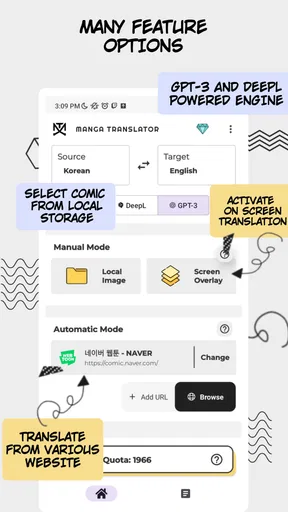
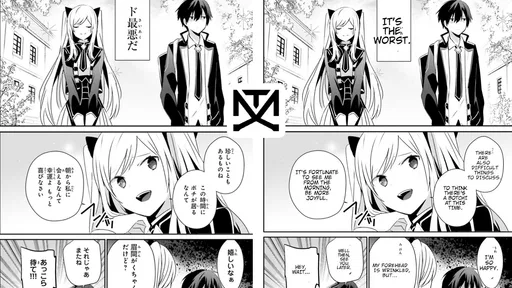
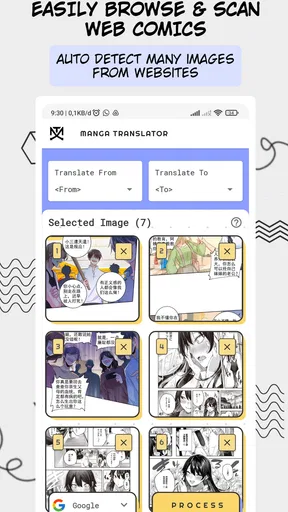
Our Review of Manga Translator - Translate
 Analysis by Appyee
I like the idea behind Manga Translator - Translate: when a comic page is written in a language I can’t read, I want a quick way to understand what is happening without abandoning the story to search every line elsewhere. This Comics app is built around that practical problem. It can make unfamiliar manga, manhwa, manhua, and other comics more approachable, though it works best as a reading aid rather than a substitute for a carefully edited human translation.
A bridge into comics you might otherwise skip
For me, the strongest case for a manga translator is not that it makes every page perfect; it is that it can help me decide whether a story is worth following and make casual reading less frustrating. If I come across a page shared by a friend or want to check a scene before committing to a series, translating the image can be more convenient than switching between a camera, a separate OCR tool, and a general-purpose translator.
That convenience has a trade-off. Comics rely on more than the words in speech bubbles: panel order, visual jokes, sound effects, and character-specific speech all shape a scene. A machine translation can give me a useful rough reading, but I still have to look at the artwork and infer tone when the wording feels odd. Think of it as a way to get the gist, not a guarantee that every joke or plot nuance will land.
Where it fits in an everyday reading routine
A realistic use is reading a few pages during a commute or on a break. I can pick an image I already have, translate the dialogue that is slowing me down, and return to the page without turning a relaxed reading session into a research project. It may also help when I want to compare my own understanding of a line with an automated result while studying a language, although I would not use a machine-rendered sentence as a model of polished grammar.
It is less suited to someone who needs publication-quality localization, relies on exact wording for close literary analysis, or expects every handwritten note and decorative sound effect to be recognized. Those readers are better served by an official translation where available, or by a human translator for material where accuracy matters. The app’s practical appeal is strongest for curiosity and convenience, not for replacing editorial work.
Getting Started with the App
First things first, downloading and setting up Manga Translator - Translate is a breeze. Available on both Android and iOS, it’s just a quick trip to the app store, and you’re good to go. The interface is user-friendly, making it super easy even for those who aren’t tech-savvy. Once you open it, the app greets you with a simple tutorial, guiding you through the basic features. Trust me, you’ll be translating in no time.
How It Works
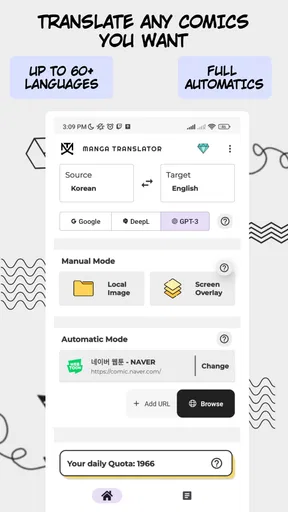
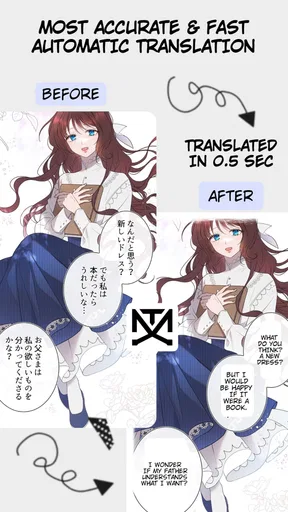
The app uses advanced OCR (Optical Character Recognition) technology to scan and translate text from manga pages. You simply take a picture of the page or upload an image, and voilà, it translates the text for you. The translation appears in real-time, and you can choose from a variety of languages. The coolest part? It doesn’t just translate word-for-word; it tries to make sense of the context, too.
Another neat feature is the ability to adjust the translation settings. You can tweak the language level, which is great if you’re looking to learn a bit of Japanese along the way. Plus, the app supports multiple file formats, so whether you have a JPEG, PNG, or even a PDF, you’re covered.
Getting a cleaner result from a comic page
Page quality matters when text recognition is involved. From my perspective, the most useful first step is to work with a clear, well-lit image and make sure the page is not cropped so tightly that speech bubbles lose their edges. A crooked photograph, glare across glossy paper, or a low-resolution scan can make the translated result harder to trust. If a line comes back strangely, I would first try a sharper image before deciding the translation itself is the problem.
There is also a helpful way to use the tool without interrupting the whole reading flow: translate only the panel or page that blocks your understanding, rather than treating every line as something that must be processed. That keeps the app in the role of a quick helper. It is especially sensible for action-heavy chapters, where the drawings already carry much of the story and translating every sound effect may add little.
Performance and Usability
Performance-wise, the app is surprisingly fast. The scans are quick and accurate, with only a few hiccups on particularly complex pages. It’s not perfect, but it’s close enough to keep you engaged without pulling your hair out. The translations are generally decent, but like any machine translation, it’s not always perfect. Occasionally, it jumbles up the context, but hey, that’s part of the fun sometimes, right?
The app also supports offline translation, which is a huge plus if you’re on the go or have a spotty internet connection. You just need to download the language packs in advance. This feature makes it super convenient for those long commutes or when you’re traveling and don’t want to rack up data charges.
What to do when a translation feels off
When a sentence seems to contradict the artwork, I would avoid building a theory around that line alone. Short comic dialogue often depends on who is speaking, what happened in the previous panel, or a pun that does not survive direct translation. Checking the surrounding panels can help restore the intended meaning, and trying a cleaner image can help when the problem is recognition rather than language.
For anyone asking whether this can replace a translated edition, my answer is no—not if the goal is a smooth, consistent reading experience from chapter to chapter. An official edition has the advantage of human editing and decisions made across the whole story. A translator app is more useful when a preferred edition is not available to you, when you are sampling a series, or when you need a quick clue about one page. If exact dialogue matters, use the app as a starting point and verify important lines elsewhere.
Customization and Additional Features
One thing I appreciate is the customization options. You can change the font size and style, which is perfect for making the text easier on the eyes. There’s also a dark mode for those late-night reading sessions. The app even allows you to save your translations, which is great if you want to revisit your favorite manga panels.
Saved translations are most useful when I treat them like personal reference notes rather than a complete archive of a series. I might keep a page that clarified a confusing character exchange or a scene I want to discuss later. That gives me a small, practical collection to revisit without expecting the app to organize a whole reading library for me. If I am following a long story, I would still keep my chapter progress and reading notes somewhere I can manage them easily.
Sharing is caring, and the app makes it simple to share your translations with friends. Whether you’re showing off a hilarious scene or discussing plot twists, it’s just a tap away. Plus, you can connect the app with your social media accounts for easy sharing.
Who is likely to get the most out of it?
The best fit is a curious comic reader who is comfortable with an occasional rough sentence and wants help crossing a language barrier one page at a time. It can also suit a learner who wants to compare a translation with the original image, provided they treat the result as a prompt for study rather than an authoritative lesson. Readers who already have access to polished translations may prefer those for regular, uninterrupted reading.
If you are choosing between this and the usual alternatives, the distinction is workflow. A general camera translator can be handy for signs and short snippets, but a comic-focused tool is more naturally suited to page images and repeated reading. A dictionary or manual OCR-and-translate process may give a learner more control, but it takes more effort. For nuanced dialogue, however, neither a quick app translation nor a generic camera tool can reliably match a skilled human localization.
There are also practical limits to keep in mind before settling into a long session. A page with tightly packed bubbles, stylized lettering, vertical text, or overlapping artwork can be a tougher test than a clean panel with clear print. I would use the result selectively and keep the original visible, since that makes it easier to notice when a translation does not fit the scene. This is a small habit, but it prevents a confident-looking line from becoming the only basis for understanding a plot point.
Cost, availability, and expectations
The app is free to download, with in-app purchases ranging from $0.99 to $49.00 per item. I would start with the free experience and see whether the translation quality fits the material I actually read before spending anything. That is particularly important if your comics tend to use elaborate lettering or dense dialogue, because your satisfaction will depend on how well the tool handles those pages, not just on how quickly it opens.
It is rated for Everyone, and Wiryaimd is the developer. The app was released on Jul 31, 2021, and its current version is 3.0.0, with Android 8.1 as the minimum operating system. It has a 3.0 average from around 1.5 thousand ratings, alongside roughly 40 written reviews, and has been installed over 100 thousand times. I take that modest average as a reason to keep expectations measured: the idea is useful, but scan conditions and translation needs can vary a lot from reader to reader.
Why You Should Try It
So, why give Manga Translator - Translate a shot? If you’re a manga lover, this app opens up a whole new world of content that was previously inaccessible. It’s like having a personal translator in your pocket. Sure, it’s not flawless, but it’s a game-changer for anyone looking to enjoy manga in its original form.
Whether you’re using it for entertainment or as a learning tool, this app offers a delightful experience. Just remember, it’s not a replacement for human translation, but it’s a fantastic tool to have in your arsenal.
In a nutshell, give it a whirl. You might just find that it becomes your go-to app for all things manga.
Privacy and Permissions
See what permissions an app requests and how it handles your data.
- Photos/Media/Files
- read the contents of your USB storage, modify or delete the contents of your USB storage
- Storage
- read the contents of your USB storage, modify or delete the contents of your USB storage
- Wi-Fi connection information
- view Wi-Fi connections
- Other
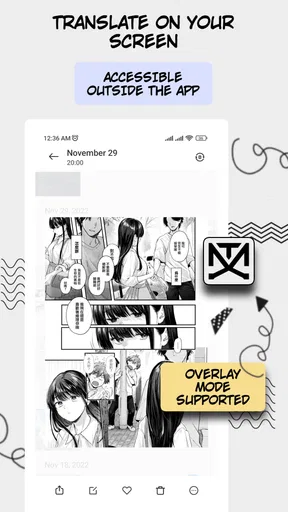
- view network connections, full network access, draw over other apps, control vibration, prevent device from sleeping, Google Play license check
Verdict
Strengths of Manga Translator - Translate
- Fast and accurate translations.
- Supports multiple languages.
- User-friendly interface.
- Offline translation available.
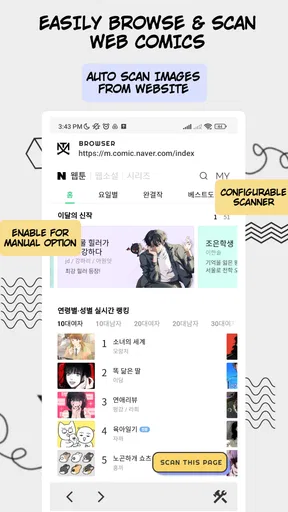
- Integrates with manga readers.
Limitations of Manga Translator - Translate
- Occasional translation errors.
- Limited free features.
- Ads in the free version.
- Requires internet for some features.
- Some manga not supported.
Similar Picks in This Category
View All
WEBTOON: Manga, Comics, Manhwa
NAVER WEBTOON4.6

MangaToon: Comic & Manga
MangaToon4.3

네이버 웹툰 - Naver Webtoon
NAVER WEBTOON4.3

Tapas – Comics and Novels
Tapas Entertainment Inc.4.2

Lezhin Comics - Daily Releases
LEZHIN ENTERTAINMENT3.3

WebComics - Webtoon & Manga
WEBCOMICS HOLDINGS HK LIMITED4.4
Frequently Asked Questions
What is Manga Translator - Translate and how does it work?
Manga Translator - Translate is an app designed to help users translate text within manga images into various languages. Using advanced OCR (Optical Character Recognition) technology, it identifies and extracts text from manga pages, enabling users to understand content without needing proficiency in the manga's original language.
What languages does Manga Translator - Translate support?
The app supports a wide range of languages, including but not limited to English, Japanese, Korean, Chinese, Spanish, and French. It continually updates to include more languages, ensuring that users worldwide can benefit from its translation capabilities.
Is Manga Translator - Translate user-friendly for beginners?
Yes, the app is designed with a user-friendly interface that is intuitive and easy to navigate. Beginners can quickly learn how to use the app with the help of guided tutorials and simple instructions provided within the application. This ease of use makes it accessible for all users.
Are there any costs associated with using Manga Translator - Translate?
While Manga Translator - Translate offers a free version with basic features, there may be in-app purchases or subscription options available for users who want access to premium features, such as higher translation accuracy, ad-free experience, and additional languages.
How accurate are the translations provided by Manga Translator - Translate?
The accuracy of translations can vary depending on the language and the quality of the original manga image. The app uses sophisticated OCR and translation algorithms, but users should be aware that some nuances and context might be lost. Continuous updates aim to improve accuracy over time.
